 60cd4311a8

Add a daemon-only build path (no Python GUI) that builds the eBPF objects
against the running kernel's headers, deriving the BPF DataLayout from
clang and finalizing with opt; a structural unprivileged check target; an
install path that never clobbers existing units/config/rules; an Arch
PKGBUILD.in + prepare.sh and a test_install.sh harness. Document the
workflow and the event-loss diagnostics in README.md and ebpf_prog/README.
Gitignore the compiled ebpf_prog/*.o artifacts.

Co-Authored-By: Claude Opus 4.8 <noreply@anthropic.com>
9.4 KiB
Join the project community on our server!



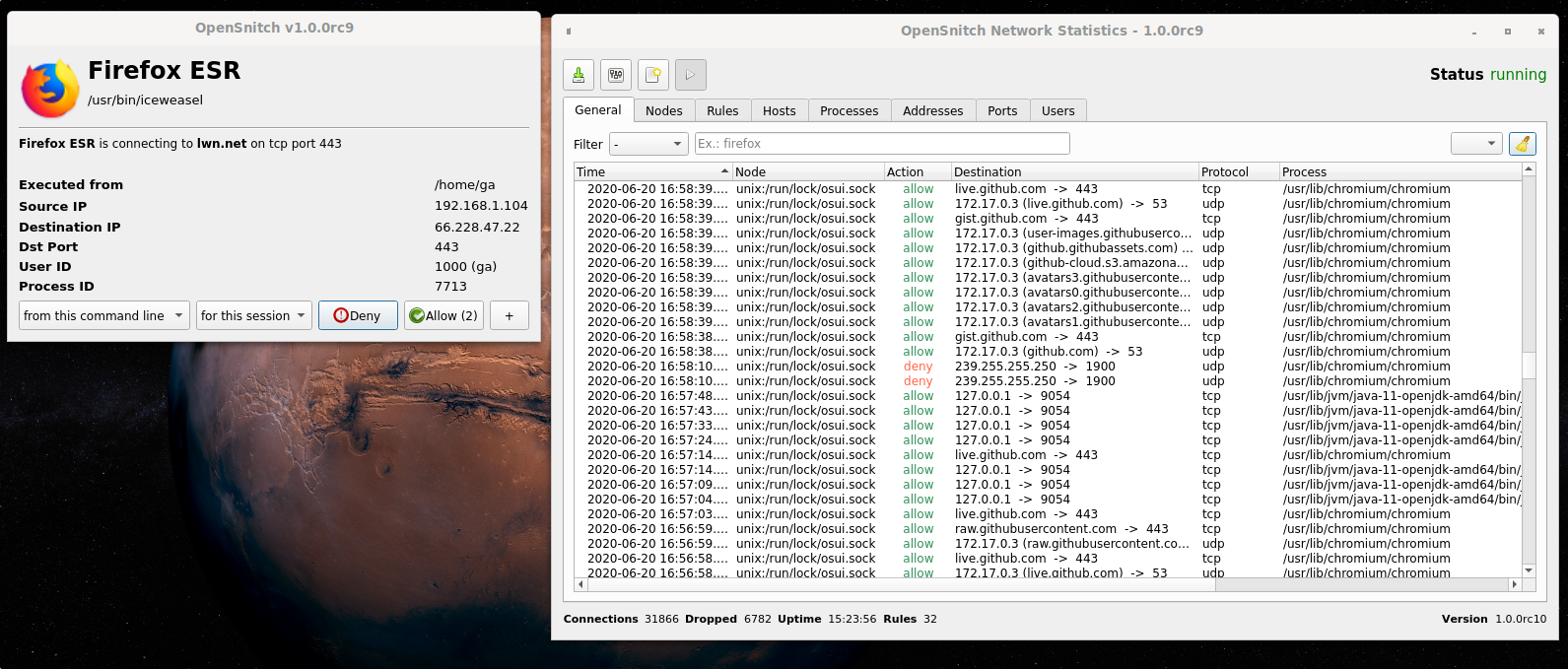
OpenSnitch is a GNU/Linux application firewall.
•• Key Features • Download • Installation • Usage examples • In the press ••
Key features
- Interactive outbound connections filtering.
- Block ads, trackers or malware domains system wide.
- Ability to configure system firewall from the GUI (nftables).
- Configure input policy, allow inbound services, etc.
- Manage multiple nodes from a centralized GUI.
- SIEM integration
Download
Download deb/rpm packages for your system from https://github.com/evilsocket/opensnitch/releases
Installation
Daemon-only source build (maintained fork)
This maintained mirror defaults to the local native workflow: make builds the
Go daemon and all three eBPF objects; sudo make install installs both. Neither
command builds/installs the Python GUI or starts/restarts the service. Existing
policy and local unit files are preserved. PyQt and translation tools are not
required. Use make all-with-ui / sudo make install-with-ui only when you
explicitly want the desktop UI. Plain make clean cleans native outputs only;
clean-with-ui additionally removes generated Python protocol files. Install the native development dependencies
for libnetfilter_queue, libpcap and libmnl, Go, protobuf's protoc, and LLVM
(clang, opt, llc). The eBPF build also needs matching prepared kernel
headers and binutils' readelf.
Set up the pinned Go protocol generators once (their installation directory must be on PATH), and download the pinned module dependencies explicitly:
go install google.golang.org/protobuf/cmd/protoc-gen-go@v1.34.1
go install google.golang.org/grpc/cmd/protoc-gen-go-grpc@v1.3.0
export PATH="$PATH:$(go env GOPATH)/bin"
(cd daemon && go mod download)
Normal builds now use go build -mod=readonly, not go get. Review dependency
file changes separately; builds do not silently update the module graph.
make
make check-install
The default header path is /usr/lib/modules/$(uname -r)/build for this Arch
machine. KERNEL_VER, KERNEL_DIR and KERNEL_HEADERS remain overridable; see
ebpf_prog/README for other distributions/split headers.
Each make rebuilds and structurally checks all three eBPF objects to avoid
stale objects after a kernel/toolchain change; it does not load them into the
running kernel. make daemon-only and make ebpf remain available separately. check-install uses
stub toolchains and temporary staging directories, never sudo or a live service.
After successful unprivileged builds, an operator can run:
sudo make install
# Operator-controlled activation, after reviewing the installed unit/config:
sudo systemctl daemon-reload
sudo systemctl restart opensnitchd
The daemon installer seeds missing configuration, rules and tasks but preserves existing files/symlinks and local service units. It does not migrate or merge policy. Neither native installer calls systemctl or starts/restarts the daemon; review the intended configuration and unit, then reload/start the service explicitly. The eBPF installer copies checked objects as built; optional debug stripping is described in its README.
For an unprivileged package staging root, both targets honor DESTDIR and
PREFIX. For example, after building:
: "${pkgdir:?Set pkgdir to a private staging directory}" &&
test "$pkgdir" != / &&
make install-daemon DESTDIR="$pkgdir" PREFIX=/usr SYSTEMDUNITDIR=/usr/lib/systemd/system &&
make install-ebpf DESTDIR="$pkgdir" PREFIX=/usr
Here pkgdir must be an explicitly selected nonempty private staging directory;
this is a staging interface, not a complete Arch PKGBUILD. A package recipe must
also declare dependencies/configuration backup handling and be validated with
the distribution's tooling. A complete local Arch recipe is provided below.
Local Arch daemon-only package
utils/packaging/arch/prepare.sh exports committed native sources plus the
reviewed Makefile/documentation overlays, generates the Go protocol with the
pins above, records provenance, and renders a checksum-pinned local PKGBUILD.
It refuses other uncommitted/untracked native source changes rather than
silently dropping them. It never copies the Python UI, host configuration,
existing object files or binaries, and never modifies the source checkout.
# Choose a NEW absolute output directory; keep the pinned generators on PATH.
sh utils/packaging/arch/prepare.sh /absolute/new/opensnitch-package
cd /absolute/new/opensnitch-package
# Review PKGBUILD and BUILD_SOURCE.txt inside the source archive first.
makepkg --nosign
Install the declared build dependencies yourself if missing. Do not use -i
or -s for a build-only check. Generation includes explicit go mod download
in prepare; compilation itself stays readonly. By default this builds against
uname -r headers; an intentional alternate target can be selected with
OPENSNITCH_KERNEL_VERSION. This is not proof of verifier/attachment acceptance
on another kernel. The source archive is reproducible for the same revision,
overlays, generator versions and source epoch; compiler/package reproducibility
is a separate check.
The package is opensnitch-daemon-local (x86_64, no GUI), conflicts with the
combined OpenSnitch packages, and marks shipped policy files as configuration
backups. It ships the unit under /usr/lib/systemd/system and has no service
activation script. Installing it is a separate operator decision. In
particular, a manual /etc/systemd/system/opensnitchd.service override pointing
to /usr/local/bin wins over the packaged unit: review migration explicitly;
never force-overwrite configuration or assume this package switched the live
binary. No automatic migration/deletion of manual installs is attempted.
deb
$ sudo apt install ./opensnitch*.deb ./python3-opensnitch-ui*.deb
rpm
$ sudo dnf install opensnitch*.rpm
Then run: $ opensnitch-ui or launch the GUI from the Applications menu.
Please, refer to the documentation for detailed information.
OpenSnitch in action
Examples of OpenSnitch intercepting unexpected connections:
https://github.com/evilsocket/opensnitch/discussions/categories/show-and-tell
Have you seen a connection you didn't expect? submit it!
In the press
- 2017 PenTest Magazine
- 11/2019 It's Foss
- 03/2020 Linux Format #232
- 08/2020 Linux Magazine Polska #194
- 08/2021 Linux Format #280
- 02/2022 Linux User
- 06/2022 Linux Magazine #259
Donations
If you find OpenSnitch useful and want to donate to the dedicated developers, you can do it from the Sponsor this project section on the right side of this repository.
You can see here who are the current maintainers of OpenSnitch: https://github.com/evilsocket/opensnitch/commits/master
Contributors
Translating
